Skip to content

Changelog

Latest updates and improvements in the new feature category.

Follow us on X

All changelog posts

  • Web Chat for in-app agent conversations

    Embed a Novu Connect agent in your React application while Novu handles live delivery, history, approvals, and conversation state.

    Authors:
    Adam ChmaraVictor Yakubu
    Adam C., Victor Y.
    Cover image for Web Chat for in-app agent conversations

    Web Chat is now available in open beta on Novu Connect. It gives your agent an in-app channel, so users can start and continue a conversation inside your product instead of moving to Slack, Microsoft Teams, WhatsApp, Telegram, or email.

    The React client is headless. You build the message list, composer, and layout that fit your product. Novu manages the live connection, conversation history, agent-run state, tool approvals, and activity visible in the Dashboard.

    Read more: Web Chat for in-app agent conversations
  • Agent-Assigned Workflows

    Turn a workflow notification into the first turn of an agent conversation, with the original message and trigger payload already in context.

    Authors:
    Nikita GrossmanVictor Yakubu
    Nikita G., Victor Y.
    Cover image for Agent-Assigned Workflows

    You can now assign an agent to a workflow from the Novu Dashboard. Workflow messages are sent through the agent's connected channels, and when a subscriber replies, Novu routes the reply to that agent with the originating workflow, message, and trigger payload already in context.

    This closes the gap between notifications and conversations. A workflow can send “Your order has shipped,” the subscriber can reply “Can I change the delivery address?”, and the agent receives the order data from the original trigger without a separate correlation layer in your application.

    Read more: Agent-Assigned Workflows
  • Rich chat editor for workflow Chat steps

    Build structured chat notifications with text, images, lists, link buttons, variables, and provider-aware previews from the workflow editor.

    Authors:
    Paweł TymczukVictor Yakubu
    Paweł T., Victor Y.
    Rich chat editor for workflow Chat steps

    Workflow Chat steps now include a visual block editor. Instead of limiting every workflow-sent chat notification to one text body, you can compose structured messages for approvals, reports, summaries, prompts, and calls to action from the Dashboard.

    Novu converts the shared message into a provider-specific format at delivery time. You author the content once, then inspect how it may appear on each chat provider connected to the environment.

    Read more: Rich chat editor for workflow Chat steps
  • Tool steps for on-call services and webhooks

    Send workflow notifications to subscriber-specific PagerDuty, Opsgenie, Grafana IRM/OnCall, or custom HTTP endpoints through a first-class Tool channel.

    Authors:
    George DjabarovVictor Yakubu
    George D., Victor Y.
    Tool channel steps for on-call services and webhooks

    Tool is now a first-class channel in Novu workflows, alongside Email, SMS, Chat, and Push. Add a Tool step when a notification needs to create an on-call alert or reach an HTTP endpoint instead of a person-facing messaging channel.

    The first Tool providers are PagerDuty, Opsgenie, Grafana, and Tool Webhook.

    Read more: Tool steps for on-call services and webhooks
  • LangChain adapter for Novu Connect

    Connect a LangChain or LangGraph agent to Slack, Microsoft Teams, WhatsApp, Telegram, and email, with mapped conversation history and in-channel tool approval on the adapter-managed path.

    Langchain adapter for Novu Connect

    The LangChain adapter is now available through @novu/framework/langchain. It gives teams already using LangChain or LangGraph a direct path to Novu Connect without rebuilding their agent for each communication channel.

    Read more: LangChain adapter for Novu Connect
  • Vercel AI SDK adapter for Novu Connect

    Bring an existing Vercel AI SDK agent to Slack, Microsoft Teams, WhatsApp, Telegram, and email while keeping the same model, tools, and application code.

    Vercel AI SDK adapter for Novu Connect

    The Vercel AI SDK adapter is now available through @novu/framework/ai-sdk. Your agent continues to run your application. Novu Connect receives messages from each connected channel, passes the conversation context to your handler, and delivers the response that your handler returns.

    Read more: Vercel AI SDK adapter for Novu Connect
  • Subscriber Credentials Drawer

    Manage every subscriber's delivery credentials from one drawer in the dashboard.

    Author:Paweł Tymczuk
    Paweł Tymczuk
    Credential Management UI

    You can now view and manage all of a subscriber's delivery credentials right from the dashboard. Open any subscriber, switch to the new Credentials tab, and every channel they can be reached on is in one place — no more round-trips to the API to check why a push or chat message didn't land.

    Read more: Subscriber Credentials Drawer
  • Novu Chat SDK Adapter

    Bring your Chat SDK agent to Slack, Teams, WhatsApp, Telegram, and email: deliver multi-channel notifications from one trigger, resolve every channel to one unified subscriber, and drop in React connect components to put channels in front of your end-customers.

    The @novu/chat-sdk-adapter is now available. Wire it into your Chat SDK app and Novu manages credentials, identity, and delivery across Slack, Microsoft Teams, WhatsApp, Telegram, and email.

    Read more: Novu Chat SDK Adapter
  • <Subscription /> component

    Give users control over what notifications they receive - at the topic level. Create subscribe/unsubscribe flows that fit the context. Set workflow preferences and use advanced conditional rules. All of this can be done with a customizable React component.

    Authors:
    Paweł TymczukGeorge DjabarovAdam Chmara
    Paweł T., George D., Adam C.
    <Subscription /> component
    Requirements

    v3.12.0 or higher

    We've introduced Subscriptions, a new way to manage notification delivery at the topic level. Now with full context-awareness, giving subscribers precise control over what they receive and when.

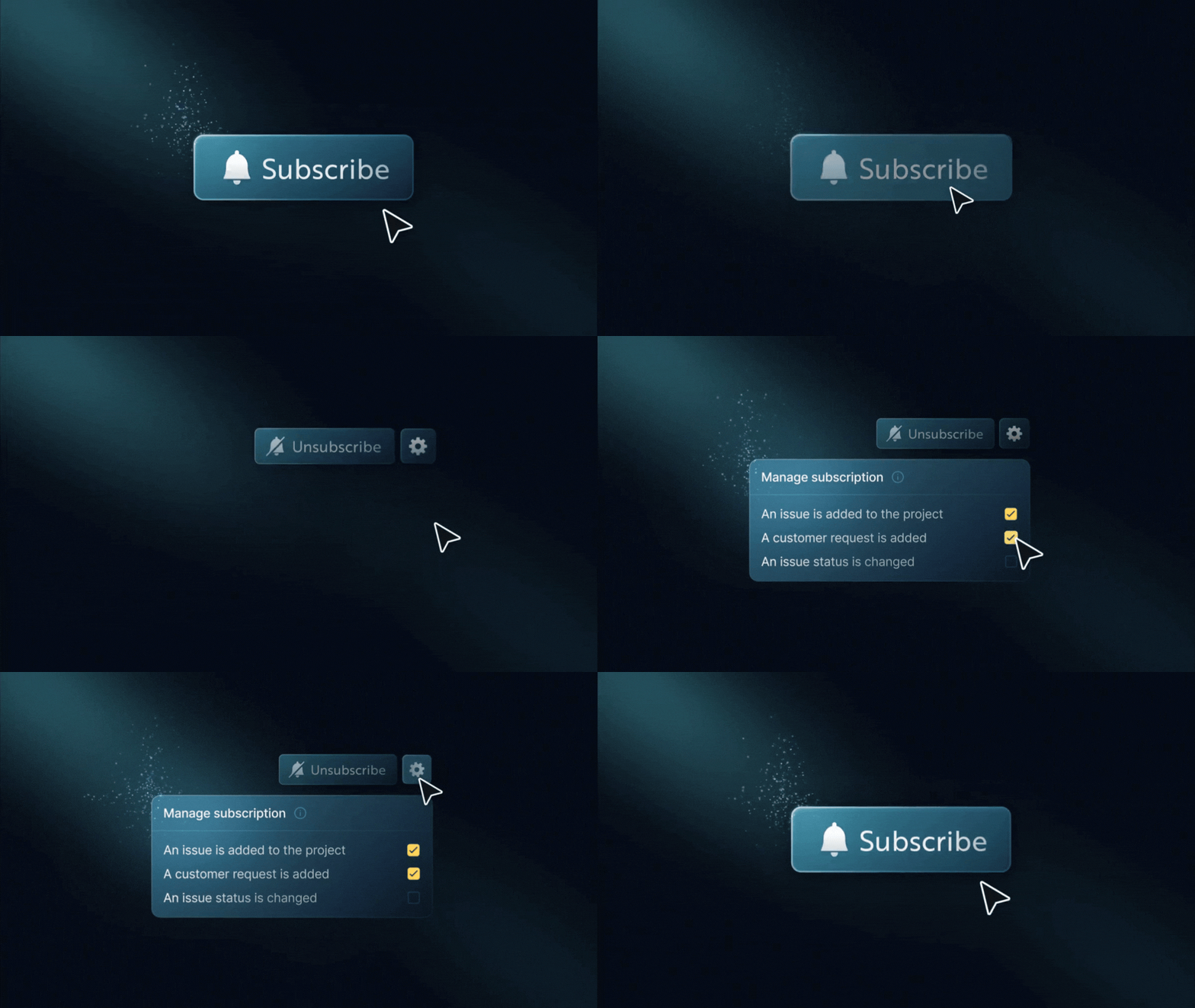
    States of <Subscription /> component

    The new <Subscription /> React component makes it easy to add subscription features to your app. You can use it for a simple “follow” button on a resource or a complete preferences view.

    Breakdown of the <Subscription /> component
    • Subscribe or unsubscribe to topics (e.g., projects, issues)
    • Enable or disable specific workflows within a topic
    • Support conditional delivery rules (e.g., owner-only, thresholds, filters)
    • Context-aware preferences: manage subscriptions differently across environments, tenants, or custom contexts using contextKeys
    • Multiple subscriptions per topic with different conditions
    • Fully customizable UI with theming, localization, and headless hooks
    • Works seamlessly with Inbox and existing workflow/global preferences

    Previously, subscribers could only control notifications at the workflow or channel level.

    Subscriptions now unlock:

    • Topic-level muting (e.g., turn off updates for project:43)
    • Context-scoped preferences: filter and match subscriptions by context, with behavior safely gated behind the feature flag
    • Advanced, structured preferences stored as JSON conditions
    • Contextual subscription management directly on entities like projects or tasks
    Read more: <Subscription /> component